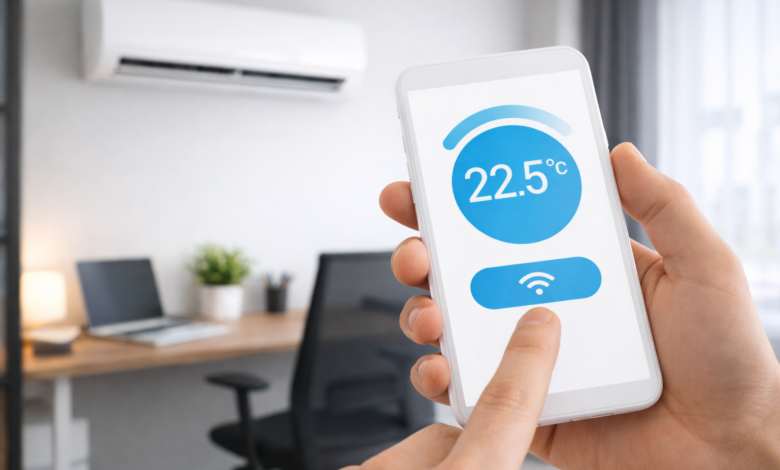
Technology has changed the way we interact with everyday devices in our homes. Today, many appliances can be controlled directly from a smartphone, including televisions, lights, security systems, and even air conditioners.
Controlling your air conditioner with your phone is not only convenient, but it can also help you save energy and make your home more comfortable before you even arrive. Imagine turning on the air conditioner while you are still on your way home, so the room is already cool when you walk in.
In this guide, you will learn several easy methods to control your air conditioner using your smartphone, whether your AC unit is modern or an older model.
Why Control Your Air Conditioner With Your Phone?
Using a smartphone to manage your air conditioner offers many advantages compared to a traditional remote control.
Here are some of the main benefits:
1. Convenience
You no longer need to search for the remote control. Your phone is always with you, so you can easily adjust the temperature or turn the unit on or off.
2. Remote Access
Many smart systems allow you to control your air conditioner from anywhere. If you forget to turn it off before leaving the house, you can simply do it from your phone.
3. Energy Savings
Being able to monitor and control your air conditioner remotely helps reduce unnecessary energy consumption.
4. Smart Home Integration
Modern systems can integrate with smart home platforms and voice assistants, making automation easier.
Method 1: Use an Air Conditioner With Built-In Wi-Fi
Many modern air conditioners already include built-in Wi-Fi connectivity. These models are designed to connect directly to your home internet network.
Once connected, you can control the unit through a dedicated mobile application provided by the manufacturer.
How to Set It Up
- Install the official app for your air conditioner brand.
- Connect the air conditioner to your home Wi-Fi network.
- Link the device with your smartphone.
- Start controlling your air conditioner remotely.
Features Available in Most Apps
Most smart AC apps allow you to:
- Turn the air conditioner on or off
- Change the temperature
- Adjust the fan speed
- Set timers and schedules
- Switch between cooling modes
This method is the easiest and most reliable if your air conditioner supports Wi-Fi.
Method 2: Use a Smartphone With Infrared (IR)
Some smartphones include an infrared sensor, which allows the phone to function like a traditional remote control.
Infrared technology is the same system used by standard AC remotes.
If your phone has an IR blaster, you can install a universal remote control app and control your air conditioner directly.
Popular Infrared Remote Apps
Some popular apps include:
- Mi Remote
- Universal TV Remote
- ASmart Remote IR
- ZaZa Remote
How It Works
After installing the app:
- Open the application.
- Choose Air Conditioner from the device list.
- Select your AC brand.
- Test different remote options until one works.
Once connected, your phone will function just like the original remote.
Method 3: Use a Smart IR Controller
If your air conditioner does not support Wi-Fi and your phone does not have infrared, you can still control it using a smart IR controller.
A smart IR controller is a small device that connects to your Wi-Fi network and sends infrared signals to your air conditioner.
It acts like a bridge between your smartphone and the AC unit.
How to Use a Smart IR Device
- Plug the device into a power outlet.
- Connect it to your Wi-Fi network.
- Install the companion mobile app.
- Select your air conditioner brand from the app.
After setup, you will be able to control your air conditioner from your phone anywhere in the house.
Some advanced devices even allow remote control from outside the home.
Method 4: Control Your Air Conditioner With Voice Commands
If your air conditioner or smart IR controller supports smart assistants, you can control it using voice commands.
Many systems work with voice assistants such as:
- Amazon Alexa
- Google Assistant
Examples of Voice Commands
You can say commands like:
- “Turn on the air conditioner.”
- “Set the temperature to 22 degrees.”
- “Turn off the AC in the living room.”
Voice control is especially useful for smart homes where multiple devices are connected together.
Control Your Air Conditioner with the Official App
To make managing your air conditioner easier, you can download the official smartphone app. This app allows you to:
Turn your air conditioner on or off from anywhere.
Adjust the temperature to your comfort.
Set schedules and timers automatically.
Monitor energy usage and save electricity.
You can download the app from the official stores:
Tips for Better Air Conditioner Control From Your Phone
To get the best experience when controlling your air conditioner with your smartphone, keep the following tips in mind:
Keep Your Wi-Fi Stable
A strong and stable internet connection ensures smooth communication between your phone and the air conditioner.
Update Your Apps
Always keep the control apps updated to avoid bugs and improve performance.
Use Scheduling
Setting automatic schedules helps maintain comfort while saving energy.
Position Smart IR Devices Correctly
If you are using a smart infrared controller, place it where it can easily send signals to the air conditioner.
Is It Safe to Control Your AC With a Phone?
Yes, controlling your air conditioner with a smartphone is generally safe as long as you use official applications or trusted smart home devices.
Make sure to:
- Use secure Wi-Fi networks
- Update apps regularly
- Avoid installing unknown applications
These steps help protect your devices from security risks.
Final Thoughts
Controlling your air conditioner with your smartphone is a simple upgrade that can make your home more comfortable and efficient. Whether your AC unit supports Wi-Fi, infrared, or requires a smart controller, there are several solutions available.
With just a few steps, you can turn your traditional air conditioner into a smart device that can be controlled anytime and from anywhere.
As smart home technology continues to grow, managing your household appliances through your phone will become even easier and more common in the future.